



As an HR professional, you already juggle a ton: payroll, recruitment, training, benefits, and more. Keeping all that data in sync can feel like a second full-time job on top of the one you already have. That’s where HRIS integrations come in. They connect your systems so information flows automatically, cutting out repetitive tasks and the headaches that come with them.
In fact, a 2024 Forrester study found that 48% of payroll leaders were experiencing more payroll errors and inaccuracies, indicating that better data management isn’t just desirable, but essential.
This guide helps make HRIS integrations actually work for you: planning your setup, avoiding common pitfalls, and exploring the tools that make your job easier in 2025.
Key Takeaways:
- HRIS Integrations: Connect your core HR system with tools like payroll, ATS, LMS, and benefits platforms to reduce errors and save time.
- Automation: Automate data flows to give HR teams real-time visibility and free them to focus on strategic initiatives and employee development.
- Integration Types: Include payroll, ATS, LMS, time & attendance, and benefits administration, each serving a specific purpose in the employee lifecycle.
- Implementation: Requires planning, choosing compatible systems, aligning data, testing, training teams, monitoring performance, and expert support.
- Challenges: Include data inconsistencies, system compatibility issues, stakeholder alignment, security concerns, insufficient testing, and ongoing maintenance.
- Outcome: A thoughtfully integrated HR ecosystem, like Synergita, ensures smooth workflows, improves productivity, and allows teams to focus on people, not processes.
Understanding HRIS Integrations and Their Key Types
Think of HRIS integrations as the bridges connecting your main HR system to all the other tools your team relies on. Instead of juggling multiple spreadsheets, manually entering data, or worrying about errors slipping through the cracks, these integrations let information flow automatically.
That means fewer mistakes, real-time visibility into your workforce, and more time for HR to focus on meaningful tasks, such as enhancing employee experience, supporting career growth, or managing employee goals.
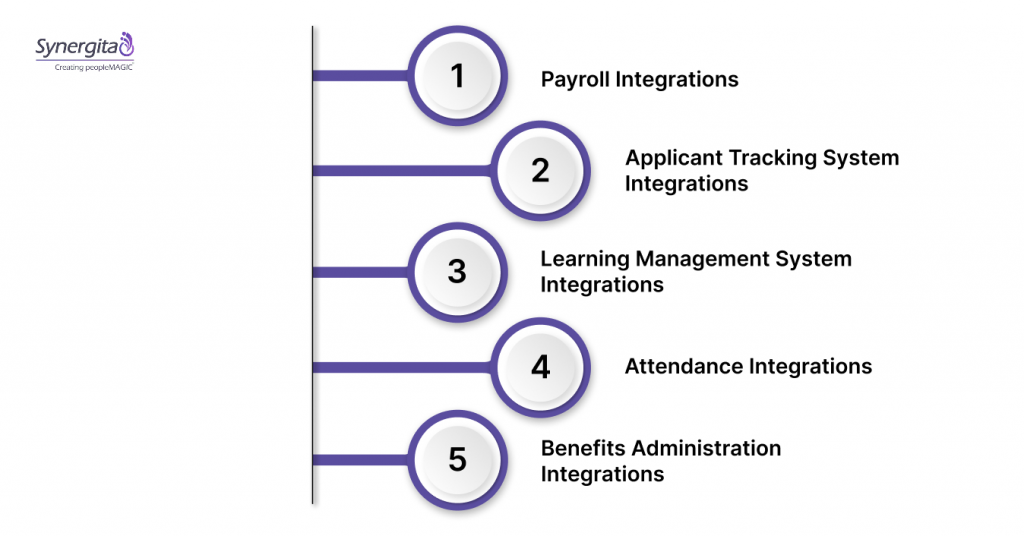
HRIS integrations typically cover several essential areas, each serving a unique purpose across the employee lifecycle:
1. Payroll Integrations
Automatically push employee hours, salaries, taxes, and benefits info from your HRIS straight into payroll systems. This ensures new hires, terminations, or salary changes are reflected instantly, reducing mistakes and keeping payroll compliant.
Example: Linking ADP or Paychex to your HRIS eliminates manual payroll entry, meaning fewer errors and smoother paydays for everyone.
2. Applicant Tracking System Integrations
When a candidate becomes an employee, ATS integrations ensure that all their details, like job title, start date, and compensation, are automatically updated in your HRIS. This keeps onboarding fast and accurate, with platforms like Synergita helping the process run smoothly behind the scenes.
Example: Connecting a Greenhouse or Lever ATS to your HRIS streamlines the hiring pipeline and ensures that nothing slips through the cracks.
3. Learning Management System Integrations
Sync training records, course completions, and certifications straight into your HRIS. You can even automate new learning assignments based on role changes or talent reviews.
Example: Integrating Cornerstone or SAP Litmos with your HRIS gives a clear view of skills, keeps teams compliant, and helps employees grow in their roles.
4. Time and Attendance Integrations
Track clock-ins, leave requests, and shift schedules automatically. This not only saves time but also ensures that payroll accurately reflects the actual hours worked.
Example: Connecting Kronos or TSheets reduces payroll errors and simplifies compliance with labor laws.
5. Benefits Administration Integrations
Keep benefits enrollment, updates, and eligibility synced between your HRIS and insurers. Employees get accurate, timely updates, and HR avoids chasing paper or double-checking forms.
Example: Integrating Benefitfocus or bswift streamlines benefits management and makes open enrollment much easier.
Using a connected platform like Synergita helps keep all these integrations in sync, allowing data to flow smoothly and enabling HR teams to focus on people, not processes.
With a clear understanding of the key HRIS integrations, the next step is ensuring they work seamlessly for your team.
How to Implement HRIS Integrations Successfully
Integrating your HR systems doesn’t have to be a headache. The goal isn’t just to connect tools; it’s to ensure that information moves automatically, so your team spends less time fixing errors and more time on meaningful work.
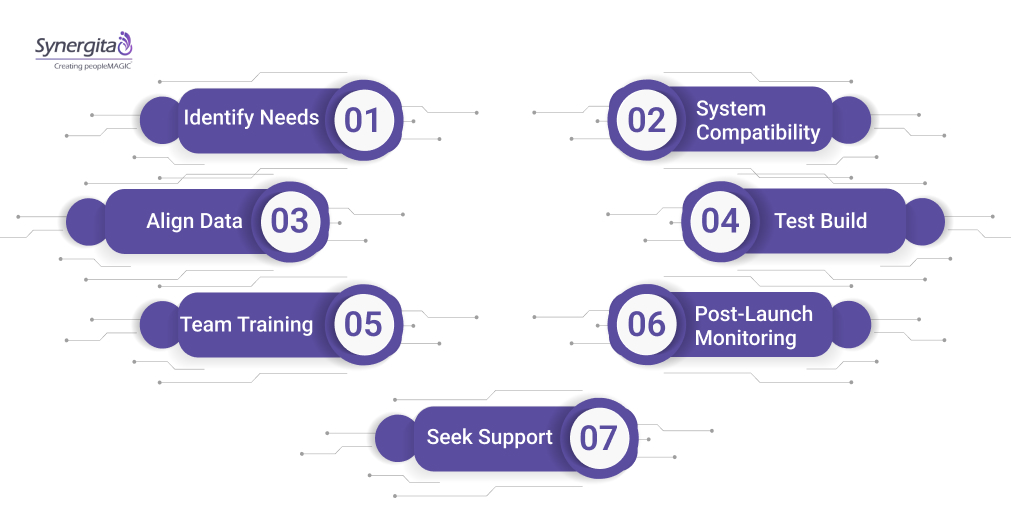
Here’s a step-by-step approach to setting up integrations that actually make a difference for your team:
Step 1: Figure Out What You Actually Need
Start by examining your current HR processes to identify where information gets stuck or duplicated. Identify which systems need to “talk” to each other and what data really matters. Bring in voices from HR, payroll, IT, and other key teams so you get a complete picture of what’s required.
Step 2: Pick Systems That Play Well Together
Not every HR tool will connect easily. Ensure your HRIS supports APIs or pre-built connectors for the systems you rely on, such as payroll, ATS, or LMS. Flexible options, such as custom APIs, can help integrate systems into your existing workflows without requiring a complete overhaul.
Step 3: Match Up Your Data
One of the trickiest parts is aligning data across different platforms. Decide upfront how fields such as employee IDs, job codes, or benefits plans should align. Standardizing your data at this stage ensures a smoother process once the integration is live.
Step 4: Build and Test Before You Launch
Set up the integration in a test environment first. Verify that data moves correctly, the trigger function works as expected, and no issues arise along the way. Testing thoroughly now prevents headaches later.
Step 5: Train Your Team and Keep Everyone in the Loop
Even the best integration fails if people don’t know how to use it. Walk HR, payroll, and management teams through the changes, explain what’s different, and show how it saves time. Clear communication helps reduce confusion and resistance.
Step 6: Keep an Eye on Things After Launch
Once the integration is live, monitor it regularly to ensure it remains stable. Monitor data accuracy, watch for synchronization issues, and make adjustments as needed. Having dashboards or alerts in place ensures problems get fixed quickly.
Step 7: Get Help When You Need It
A knowledgeable implementation team can make all the difference. Whether it’s strategic planning, building, or troubleshooting, having experts guide you ensures that your HRIS integration actually works and continues to deliver value over time.
With your HR systems working together, you can turn insights into action. The guide on Setting Effective Team Goals with Real-World Examples and Tracking Tips shows how to do just that.
Now, even with a solid implementation plan, challenges can still arise; however, knowing what to watch for makes overcoming them much easier.
Common Challenges and How to Overcome Them
HRIS integrations offer numerous benefits, but they can also present challenges along the way. From mismatched data to system incompatibilities, these obstacles can slow down progress if they aren’t addressed early. Knowing what to watch for and how to tackle it makes the process much smoother.
Below is a brief overview of common challenges you may encounter, along with practical ways to address them.
| Common Challenge | Description | How to Overcome It |
|---|---|---|
| Data Inconsistency | Disparate data formats and standards lead to synchronization errors. | Standardize data fields before integration; use Synergita’s data mapping expertise. |
| System Compatibility Issues | Not all HR software supports seamless API or connector integration. | Evaluate compatibility during system selection; leverage flexible API integrations. |
| Lack of Stakeholder Alignment | Resistance or miscommunication can slow down adoption and collaboration. | Engage all departments early; provide clear communication and training. |
| Security and Privacy Concerns | Integrating multiple systems increases the risk of data breaches. | Enforce strict security protocols; utilize Synergita’s compliance tools and secure data handling. |
| Insufficient Testing | Skipping thorough testing leads to undetected errors post-launch. | Conduct comprehensive test cycles with the integration team before going live. |
| Ongoing Maintenance Overhead | Integration requires continuous monitoring and updates. | Implement performance dashboards and regular audits using monitoring tools. |
Overcoming challenges begins with selecting the right HRIS tool; once you choose systems that align with your workflow, integrations can deliver seamless and reliable results.
Getting Your HRIS Integrations Right
HRIS integrations aren’t just connections between systems: they’re the invisible threads that keep your HR data accurate, accessible, and meaningful. When done right, they turn a patchwork of tools into a cohesive workflow, giving teams the clarity and time they need to focus on people, not processes.
For organizations ready to make their HR tech actually work together, choosing a platform that handles integrations thoughtfully can make all the difference. Synergita’s approach ensures data flows smoothly across payroll, recruitment, learning, and more, reducing friction and letting HR teams focus on the work that truly matters.
See how a well-integrated HR ecosystem can simplify your day-to-day: book a demo to experience cleaner data, smoother workflows, and a system that actually works for your team.
Frequently Asked Questions (FAQs)
1. How do HRIS integrations help prevent payroll errors?
By syncing employee hours, salaries, and benefits directly from the HRIS to payroll systems, integrations reduce manual entry mistakes and ensure compliance.
2. Can HRIS integrations speed up hiring and onboarding?
Yes, connecting your ATS with HRIS automatically updates new hire information, so employees are onboarded faster and accurately.
3. How do integrations track employee learning and development?
LMS integrations push course completions and certifications into your HRIS, giving managers a clear view of skills and growth opportunities.
4. What should I do if my HR systems don’t naturally connect?
Flexible API or custom integrations can bridge the gap, ensuring data flows even if systems weren’t originally designed to sync.
5. How can HRIS integrations improve workforce reporting?
By unifying data from payroll, ATS, LMS, and benefits, integrations provide HR teams with real-time dashboards for actionable insights, eliminating the need for manual consolidation.