
Poor communication is the reason for 56% of failed projects because the right people didn’t know what was happening before it was too late. A well-structured status report helps to prevent project failure, misalignment, budget overruns, and last-minute surprises.
Key Takeaways
- The five status report formats include investor updates, sprint reports, marketing campaign reports, executive summaries, and async video updates, each built for a specific need.
- Selecting the right format depends on three things: who is reading it, how often it is needed, and whether your team works in the same location or across different locations and time zones.
- A status report is effective only when it contains honest numbers, clear action items, and visible risks.
In many organizations, project failures, team misalignment, and budget overruns go unnoticed until it’s too late. This happens because status updates are not sent on time or sent incorrectly.
According to a WifiTalent Report, 44% of projects fail due to poor communication between team members and stakeholders. Yet many teams treat status reports like a formality using generic templates or outdated numbers.
A well-designed project status report prevents project failures, builds trust, and keeps teams aligned. In this guide, you find five real-world status report formats used by successful teams, from startup founders reporting to investors to distributed teams working async. The examples include a template, a filled-in version with real data, and a downloadable version ready to customize.
| Table of Contents 1. What is a Status Report 2. Status Report Examples: 5 Real Life Templates for Projects With Free Copy 3. What Are the Benefits of a Status Report 4. How to Choose the Right Format for Your Needs 5. 5 Common Mistakes to Avoid When Creating a Status Report 6. Conclusion 7. Frequently Asked Questions |
What is a Status Report
A status report is a structured document that helps a team to show where a project, team goals, or campaign stands at a specific point in time. It helps the project owner to inform stakeholders about what is completed, what is in progress, what risks exist, and how the team tracks progress.
Unlike a progress report, which tracks overall progress toward a goal over time, a status report is a point-in-time snapshot.
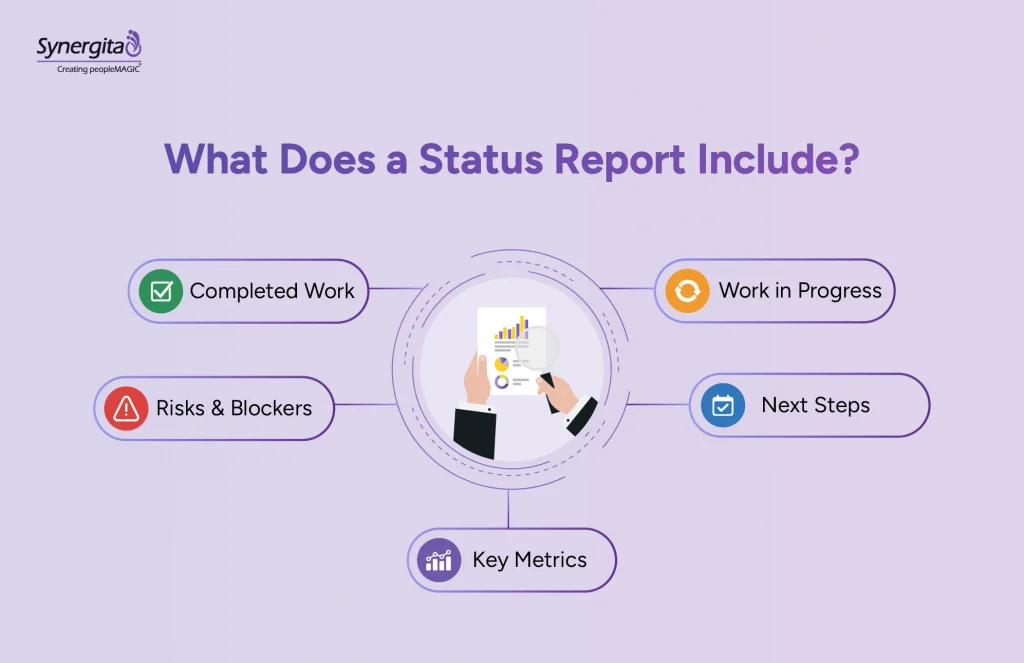
For example, an engineering manager sends a status report at the end of every sprint. A marketing lead sends it during an active campaign. In many organizations, these updates are also used to track the status of objectives and key results. The format changes depending on the audience, but the purpose is to keep the right people informed at every stage.
Suggested Reading: How to Track OKR Progress Effectively
Status Report Examples: 5 Real Life Templates for Projects With Free Copy
Here are the five weekly status update templates for different teams.
Copy These 5 Status Report Templates Free
1. Investor/Founder Update (Startup)
Investors don’t want lengthy narratives. They want correct information, progress, and clarity on what comes next.
Who uses it: Founders and early-stage teams
Frequency: Weekly/bi-weekly
Audience: Investors, board members
When to use it: Ideal for early-stage companies sharing regular (weekly or bi-weekly) updates with investors and board members.
Template Structure
| Highlights (2-3 wins) | [Achievement 1][Achievement 2][Achievement 3] |
| Metrics (Growth, engagement, runway) | MRR: $[amount]CAC: $[amount]Churn Rate: [%]Runway Remaining: [months] |
| Risks & Blockers | [Risk 1] Potential impact: [description][Risk 2] Potential impact: [description] |
| Help Needed | [Specific request and why you need it] |
| Next Week Priorities | [Priority 1][Priority 2] |
Real Example
| Highlights (2-3 wins) | Signed first enterprise customer (Acme Corp); $50K annual contractLaunched mobile app on iOS and AndroidHired VP of Sales (started Monday) |
| Metrics (Growth, engagement, runway) | MRR: $47,500 (up from $35K last week)CAC: $1,200 (down from $1,800 last month)Churn Rate: 2% (goal: <3%)Runway Remaining: 14 months |
| Risks & Blockers | Android app approval delayed Potential Impact: 1-2 week delay in launch |
| Help Needed | Introductions to enterprise accounts in the Fortune 500. We’re closing deals with larger customers and need a few warm intros. |
| Next Week Priorities | Launch Android app Schedule customer success calls with first 3 customersFinalize product roadmap for next quarter |
| Next Sprint Preview | [Priority 1] [Priority 2] |
2. Agile/Sprint Status Report (Engineering)
Engineering teams operate in sprints. This report shows how the team’s work aligns with the outcomes stakeholders are looking for.
Who uses it: Engineering managers, product leads
Frequency: Bi-weekly (end of sprint)
Audience: Team, stakeholders, executives
When to use it: 2-week sprint cycles, Agile/Scrum teams, organizations running multiple ongoing projects.
Template Structure
| Sprint Goal & Summary | Sprint: [Sprint number/dates]Goal: [One-sentence goal]Status: [Met / Partially Met / Missed] |
| Completed Items | [Item name] Benefits: [What this unlocks][Item name]Benefits: [What this unlocks] |
| In-Progress Items | [Item name] : [% complete][Item name] : [% complete] |
| Blocked/At-Risk Items | [Item name] Reason: [blocker] Owner: [person][Item name] Reason: [blocker] Owner: [person] |
| Technical Debt Notes | [Work completed or noted] |
| Next Sprint Preview | [Priority 1] [Priority 2] |
Real Example
| Sprint Goal & Summary | Sprint: Sprint 12 (Nov 4-15)Goal: Complete OAuth2 integration and reduce page load timeStatus: Met |
| Completed Items | 1. Implement OAuth2 authentication Benefits: Third-party login, eliminates password resets 2. Optimize database queries for dashboard Benefits: 40% faster page loads, improves UX 3. Add two-factor authentication Benefits: Enterprise compliance requirements |
| In-Progress Items | Payment processing API integration: 75% completeMobile app notification system: 50% complete |
| Blocked/At-risk Items | Email verification service; Blocked by third-party API delays Owner: Sarah ChenTimeline: Should be unblocked by EOW |
| Technical Debt Notes | Refactored CSS module (reduced bundle by 15KB)Upgraded React to latest LTS version |
| Next Sprint Preview | Complete payment API integration Launch mobile notifications Add user analytics dashboard |
3. Marketing/Campaign Status Report
Marketing campaigns run on data. This report helps stakeholders see what’s working, what’s not, and how efforts translate into real results.
Who uses it: Marketing managers, campaign owners
Frequency: Weekly
Audience: Marketing team, CMO, executives
When to use it: Active campaigns running, weekly stakeholder updates, organizations with multiple campaigns in parallel.
Template Structure
| Campaign Performance (vs. Goals) | Campaign: [Campaign name]Goal: [Target metric/number]Current: [Actual number]Status: [Green/Yellow/Red] |
| Budget Spend vs. Plan | Budget Allocated: $[amount]Budget Spent: $[amount]Remaining: $[amount]Pace: [On track / Overspending / Underspending] |
| Lead Quality & Conversion | Leads Generated: [number]Qualified Leads: [number]Conversion Rate: [%]Cost per Qualified Lead: $[amount] |
| Wins & Learnings | [What worked][What improved] |
| Next Week Priorities | [Priority 1][Priority 2] |
| Risks/Adjustments Needed | [Risk or needed adjustment] |
Real Example
| Campaign Performance (vs. Goals) | Campaign: Black Friday Email SeriesGoal: 10,000 leadsCurrent: 8,247 leadsStatus: Yellow (82% of target, trending on pace) |
| Budget Spend vs. Plan | Budget Allocated: $8,000Budget Spent: $6,200Remaining: $1,800Pace: On track (8 days remaining, $1.8K spend left) |
| Lead Quality & Conversion | Leads Generated: 8,247Qualified Leads: 1,647Conversion Rate: 20%Cost per Qualified Lead: $3.76 |
| Wins & Learnings | Email A (personalized subject lines) had 35% open rate vs. 22% averageSMS follow-up improved conversion by 8%; will expand next campaignRetargeting ads underperforming; pausing and reallocating budget |
| Next Week Priorities | Test new email send time (12 PM vs. 9 AM) Launch retargeting campaign for customers who abandons cart Prepare post-campaign analysis |
| Risks/Adjustments Needed | iOS privacy changes impacting tracking; some conversion data incompleteMoving $400 from underperforming display ads to email |
4. Executive/C-Suite Status Report
Executives don’t want too many details; they want headlines and outcomes, so these reports must be to the point.
Who uses it: Department heads and executives
Frequency: Monthly
Audience: Executive/C-suite
When to use it: Monthly board or leadership meetings, department-wide updates, investor presentations.
Template Structure
| Top 3 Wins (with metrics) | 1. [Win] : Impact: [metric]2. [Win] : Impact: [metric]3. [Win] : Impact: [metric] |
| Top 3 Risks/Blockers | 1. [Risk] : Mitigation: [action]2. [Risk] : Mitigation: [action]3. [Risk] : Mitigation: [action] |
| Financial Status (Budget, spend) | Budget Allocated: $[amount]Budget Spent: $[amount]Variance: [+/- $amount or %] |
| Strategic Progress (vs. OKRs) | OKR 1: [Progress %] toward [target] OKR 2: [Progress %] toward [target] |
| Team Health (Headcount, morale) | Headcount: [current vs. plan]Open Roles: [number]Turnover: [yes/no anomalies]Morale: [assessment] |
| Executive Summary Dashboard | [Scorecard: Red/Yellow/Green across key metrics] |
Real Example
| Top 3 Wins (with metrics) | 1. Launched product in EU market: $200K MRR in first month (beat goal of $150K)2. Signed 3 enterprise customers: $500K annual contract value3. Reduced customer churn from 5% to 3%: improved retention strategy working |
| Top 3 Risks/Blockers | 1. Competitor launched cheaper alternative Action plan: Highlighting premium features, adding annual plan discount2. Hiring delayed for engineering team Action plan: Expanding recruiter budget, using agency for urgent roles3. Q4 budget may exceed 12% of allotted amount Action plan: Reviewing marketing spend, deferring non-critical projects |
| Financial Status (Budget, spend) | Budget Allocated: $2,500,000 Budget Spent: $1,950,000 Variance: -$550,000 (78% spent, on pace) |
| Strategic Progress (vs. OKRs) | OKR: Achieve $500K MRR by year-end; 85% toward target ($425K current) OKR: Land 5 enterprise customers; 60% complete (3 signed, 2 in pipeline) OKR: Reduce churn to 2%; 150% complete (achieved 3%, beat target) |
| Team Health (Headcount, morale) | Headcount: 42 (plan: 45, hiring 3 engineers) Open Roles: 3 Turnover: No unexpected departures this month Morale: Strong (recent survey: 4.2/5) |
| Executive Summary Dashboard | ✓ Revenue on pace ✓ Team growing as planned ⚠ Churn improvement is strong, but hiring is slightly behind ✓ Market expansion ahead of plan |
5. Async Video Status Report (Remote Teams)
Async teams can operate across different schedules, making real-time meetings difficult. Video status updates provide a fast way to communicate the status. It also adds more context than written reports.
Who uses it: Distributed and remote teams
Frequency: Weekly
Audience: Entire team, async-first organizations
When to use it: For fully distributed and remote teams when you want to share updates clearly without requiring everyone to be present in the meeting.
Template Structure
| Video (3-5 minutes) | What was accomplished [Describe completed work, metrics, wins] What’s coming next [2-3 priorities for next week] Blockers/Asks for help [What you need from others] |
| Written Recap | |
| Key metrics | [Metric 1]: [number] [Metric 2]: [number] [Metric 3]: [number] [Metric 4]: [number] |
| Links to resources | [Link to dashboard/doc/PR] [Link to dashboard/doc/PR] |
| Action items | [Action] Owner: [name] Due: [date] [Action] Owner: [name] Due: [date] |
Real Example
| Video (3-5 minutes) | Link to Video |
| Written Recap | |
| Key metrics | Shipped customer dashboard redesign; 45 customers actively usingResolved 12 support tickets (99% within SLA)Onboarded 2 new team membersDatabase optimization reduced query time by 35% |
| Links to resources | Live dashboard: [link] Q1 planning doc (draft): [link] Weekly feature shipping: [link] |
| Action items | Marcus to review API PR Due: Wednesday Sarah to finalize design system docs Due: Friday EOD Team: Provide feedback on new onboarding flowDue: Thursday |
Suggested Reading: OKR Dashboard Examples for Goal Tracking
What Are the Benefits of a Status Report
Weekly status reports offer several benefits for teams managing ongoing projects. Let’s look at the key benefits.
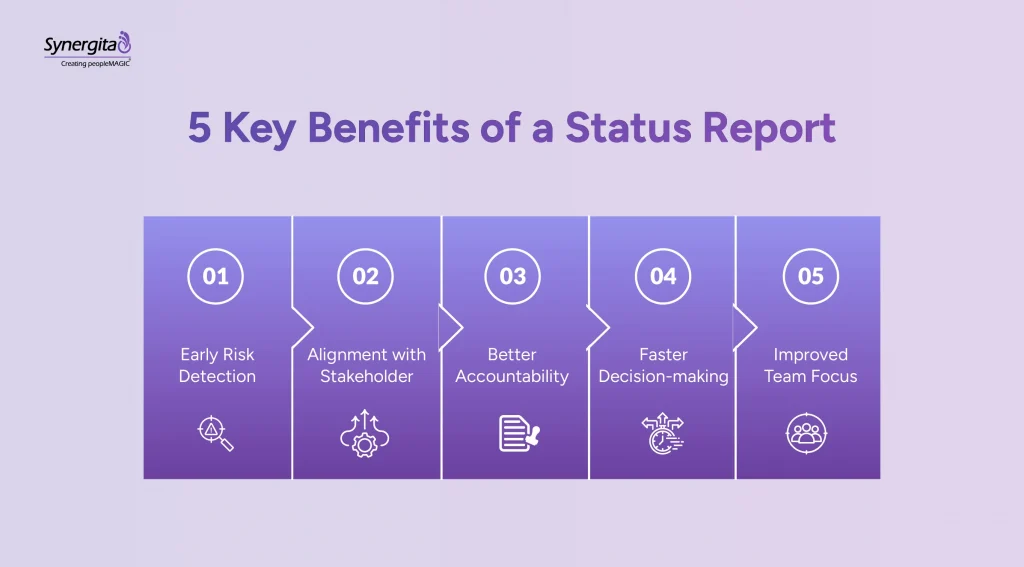
1. Early Risk Detection
It flags problems early in week two so that they can be addressed. If the same problem surfaced in week 12 or a quarter, it might be too late to solve.
2. Alignment with Stakeholders
Regular updates keep investors, executives, and cross-functional teams on the same page without requiring everyone to attend the same meeting.
3. Better Accountability
A status report contains deliverables, timelines, and owners, so everyone knows what they are responsible for and when it’s due. It reduces the need for constant follow-up.
4. Faster Decision-making
Executives and managers who have a clear understanding of where things stand can make better decisions faster. Status reports replace the guesswork that comes from fragmented updates.
5. Improved Team Focus
Writing a status report forces teams to reflect on what moved forward in a given period. This encourages people to focus on making regular progress..
How to Choose the Right Format for Your Needs
Selecting the right weekly status report format depends on your team structure, audience, and reporting frequency. Before choosing a format, consider these three factors:
1. Team Structure
Remote teams use async video updates, sprint-based teams prefer engineering reports, and sales teams rely on campaign reports.
2. The Audience
Investors want founder updates, executives want one-page summaries while team members want detailed information.
3. Your Cadence
Use weekly/bi-weekly updates for investors and campaigns, bi-weekly for sprint teams, and monthly for executive reporting.
5 Common Mistakes to Avoid When Creating a Status Report
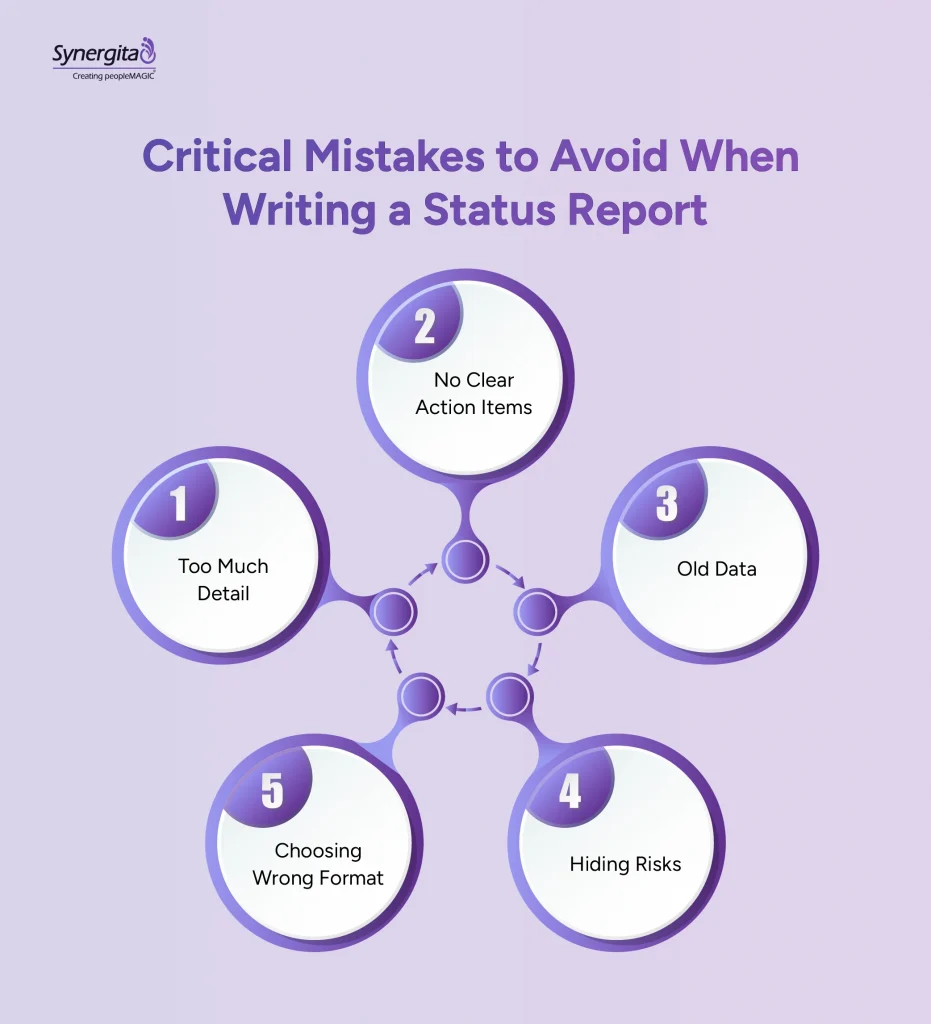
- Too Much Detail: Stakeholders skip long reports. Stick to the one-page or five-minute rule.
- No Clear Action Items: Always end with “What we need from you.” Vagueness kills momentum.
- Old Data: Update numbers the day you report. Old data destroys credibility instantly.
- Hiding Risks: Lead with risks and blockers. Investors and executives expect problems and respect transparency.
- Choosing Wrong Format: Executives won’t read 10-page reports. Match format to how your audience actually consumes information.
Conclusion
A status report helps stakeholders understand the progress and bottlenecks, and address them on time to keep projects on track. Whether you’re running a startup, an engineering team, a marketing campaign, or a distributed organization, the five formats we shared will work for you. You need to pick the right format, fill it with correct numbers, and send it consistently.
Many businesses now use a dedicated OKR management system to link status reports to strategic goals. Tools like Synergita help businesses connect weekly updates to company OKRs, making it clear how each team’s work contributes to overall business outcomes.
Try Synergita OKR software free for 14 days and see how it helps create and manage status reports.
Frequently Asked Questions
A status report is a structured document that gives a snapshot of where a project stands at a particular point in time. It usually highlights the project progress, tasks, and risks.
For example, a sprint report shows completed features, ongoing work, blockers, and priorities for the next iteration.
Weekly status reports help teams identify risks early, track progress, and ensure stakeholders are informed without frequent meetings or manual follow-ups.
To write a good status report, you should pick the right format for your audience, use current data, list completed work and risks clearly. Also, always show the action items and owners.
The three core elements of a status report are completed and ongoing work, risks or blockers and the future course of action.
Yes, status reports can be used with OKRs to track progress toward goals, helping teams connect daily work with broader business objectives. Tools like Synergita help to connect weekly updates to company goals.